GNOST — Codebase Knowledge
GNOST helps developers understand unfamiliar codebases by identifying entry points, execution flow, and core logic automatically.
It also supports code quality analysis through gnost analyze to score and flag
maintainability, robustness, observability, and readability issues.
It is designed for first-day onboarding as well as code quality triage and continuous reporting, not just code statistics.
Usage
Complete CLI usage:
usage: gnost [command]

options:
-h, --help  show this help message and exit
--version   show program's version number and exit

Available Commands:
command
    summary   Show a summary table
    stats     Show detailed stats per language
    folders   Show LOC grouped by folder
    files     Show the largest files by LOC
    version   Display gnost version
    onboard   Onboard a new codebase
    analyze   Analyze the codebase
    open      Open generated reports

Command Options:
summary|stats|folders|files:
    --include  Comma-separated folder names to include
    --exclude  Comma-separated folder names to exclude
    --progress Show a progress bar while scanning

onboard:
    --progress Show a progress bar while onboarding
    --mermaid  Generate only Mermaid flow diagram (FLOW.mmd)
    --inject   Inject onboarding link into README.md files
    --layered  Produce Layered mermaid as Entry -> Core -> Leaf
    --depth    Limit execution flow depth (e.g. --depth 2)

analyze:
    path                    File or directory to analyze (default: .)
    -a, --analyzer          Enable only specific analyzers
    --parallel              Run analyzers in parallel
    -o, --out               Write JSON and HTML report to docs/analysis/gnost_analysis.json|html
    -v, --verbose           Show traceback on failures
    --quiet                 Reduce logs; keep warnings/errors only
    --list-analyzers        List available analyzers and exit
    --timeout SECONDS       Analyzer timeout (default: 900)
    --compact               Write compact JSON when --out is used
    --no-progress           Hide progress updates
    --max-findings N        Per-analyzer findings limit (default: 1000)

open:
    report|rpt              Open the generated report in browser

files:
    --top      Number of files to show (default: 5)
Use `gnost <command> --help` for full command options.
Run GNOST commands from the root of a repository:
gnost summary [path]
gnost stats [path]
gnost folders [path]
gnost files [path] --top 10
gnost onboard [path]
gnost analyze [path] --parallel -o
gnost open report
Subcommand usage:
gnost summary [path] [--include INCLUDE] [--exclude EXCLUDE] [--progress]
gnost stats [path] [--include INCLUDE] [--exclude EXCLUDE] [--progress]
gnost folders [path] [--include INCLUDE] [--exclude EXCLUDE] [--progress]
gnost files [path] [--include INCLUDE] [--exclude EXCLUDE] [--progress] [--top TOP]
gnost onboard [path] [--mermaid] [--progress] [--inject] [--layered] [--depth DEPTH]
gnost analyze [path] [--parallel] [--out] [--list-analyzers] [--no-progress]
gnost open report|rpt
gnost version
Key Commands
summaryShow a high-level project summary.
statsShow detailed language statistics.
foldersShow lines of code grouped by folder.
filesShow the largest files by lines of code.
onboardGenerate onboarding summary and execution flow outputs.
analyzeAnalyze code quality and generate JSON/HTML findings report.
openOpen the generated analysis report from terminal.
versionDisplay GNOST version.
Onboarding & Flow Analysis
Generate onboarding documentation:
gnost onboard .
Generate only a Mermaid flow diagram:
gnost onboard . --mermaid
This produces:
ONBOARD.md — onboarding guide for new contributors
flow folder — pure Mermaid execution flow diagrams
flow-full.md — Full Flow diagram
flow-overview.mmd — Overview Mermaid with entry and core nodes
entry-paths.md — Mermaid of different entry paths
folder-paths.md — Mermaid of all paths inside different folders
Code Analysis
Run quality analysis:
gnost analyze .
Run with all analyzers and write report files:
gnost analyze . --parallel -o
Available findings output:
- Terminal rich table with analyzer score and severity counts
- ``docs/analysis/gnost_analysis.json`` for CI or scripting
- ``docs/analysis/gnost_analysis.html`` for interactive inspection
Example report:
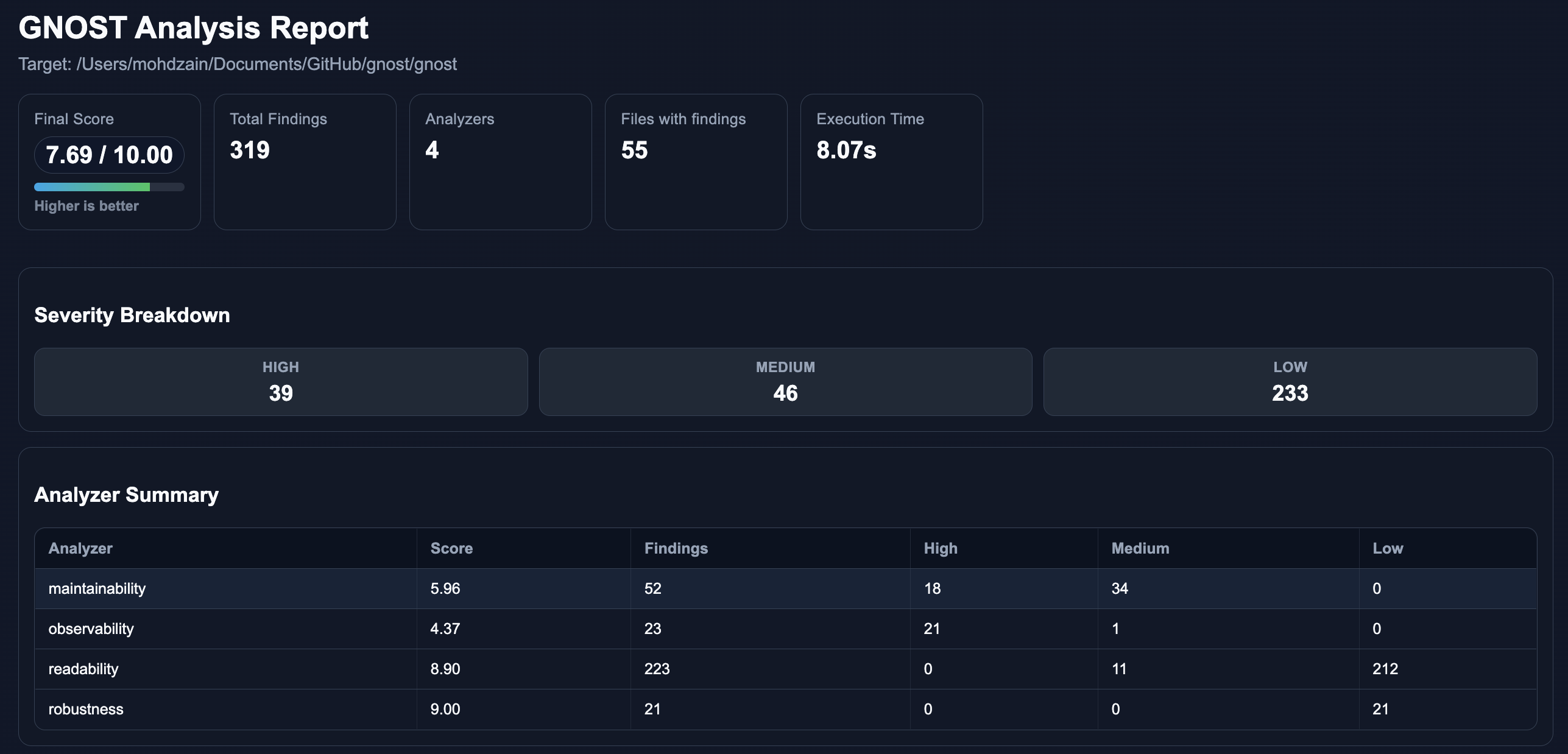
Open report:
gnost open report
Use CLI docs
Use dedicated pages for details:
Options
--includeComma-separated folders to include.
--excludeComma-separated folders to exclude.
--topNumber of files to show with
files.--progressShow a progress bar while scanning or onboarding.
--mermaidGenerate only Mermaid flow diagram (FLOW.mmd) (onboard).
--injectInject onboarding link into README.md (onboard).
--layeredProduce Layered mermaid as Entry -> Core -> Leaf (onboard).
--depthLimit execution flow depth (onboard) (e.g.
--depth 2).--analyzerSelect analyzer(s) by name in analyze.
-aAlias for
--analyzer.-oSave analysis results in
docs/analysis(JSON + HTML).--timeoutTime limit for analyzer runs.
--compactUse compact JSON output with
--out.--max-findingsLimit per-analyzer findings to keep output bounded.
--versionShow version and exit.
--helpShow help information.
Examples
Run GNOST on the current directory:
gnost summary .
gnost stats .
gnost onboard .
Generate only a flow diagram:
gnost onboard . --mermaid
Generate layered flow diagram:
gnost onboard . --layered
Generate flow diagram with desired depth:
gnost onboard . --depth N
Generate layered flow diagram with depth of 3:
gnost onboard . --layered --depth 3
Show largest files:
gnost files src --top 20
Analyze project:
gnost analyze . --parallel -o
gnost open report
Supported Languages
Python
JavaScript
TypeScript
Java
Analyzer Guide
Links
Source Code: https://github.com/mohdzain98/gnost
Documentation: https://gnost.readthedocs.io